Rio
Tested Software version 0.5.27 on Linux. The homepage URL of this terminal is https://rioterm.com/. Full results available at ucs-detect repository path data/rio.yaml.
Score Breakdown
Detailed breakdown of how scores are calculated for Rio:
# |
Score Type |
Raw Score |
Final Scaled Score |
|---|---|---|---|
1 |
93.87% |
92.4% |
|
2 |
99.77% |
99.7% |
|
3 |
100.00% |
100.0% |
|
4 |
99.59% |
99.6% |
|
5 |
100.00% |
100.0% |
|
6 |
89.24% |
(excluded) |
|
7 |
0.00% |
0.0% |
|
8 |
0.00% |
0.0% |
|
9 |
100.00% |
100.0% |
|
10 |
66.67% |
66.7% |
|
11 |
100% |
100.0% |
|
12 |
50.9% |
50.9% |
Score Comparison Plot:
The following plot shows how this terminal’s scores compare to all other terminals tested.
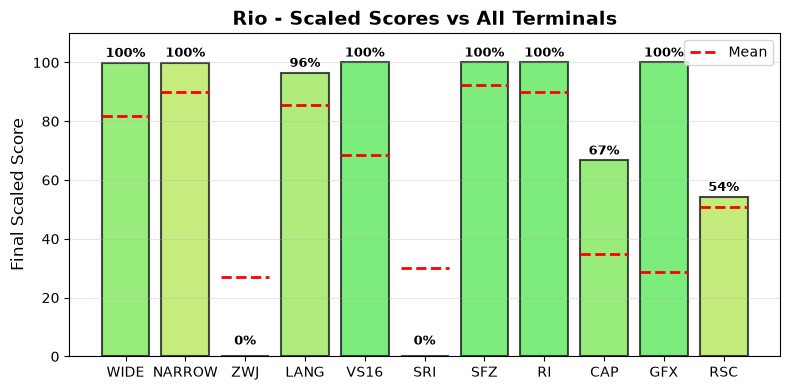
Scaled scores comparison across all metrics (normalized 0-100%)
Final Scaled Score Calculation:
Raw Final Score: 86.93% (weighted average: WIDE + NARROW + ZWJ + LANG + VS16 + 0.33 * SRI + 0.33 * SFZ + RI + CAP + 0.5 * GFX) the categorized ‘average’ absolute support level of this terminal.
Note
RSC (Resources) is a composite CPU, memory, and runtime score, displayed for comparison but excluded from the final score FEAT (Features) is the fraction of notable features supported. GFX (Graphics) scores 100% for modern protocols (iTerm2, Kitty), 50% for legacy only (Sixel, ReGIS), 0% for none.
Final Scaled Score: 78.4% (normalized across all terminals tested). Final Scaled scores are normalized (0-100%) relative to all terminals tested
WIDE Score Details:
Wide character support calculation:
Total successful contested codepoints: 475
Total contested codepoints tested: 506
Formula: 475 / 506
Result: 93.87%
NARROW Score Details:
Narrow character support calculation:
Total successful contested codepoints: 5582
Total contested codepoints tested: 5595
Formula: 5582 / 5595
Result: 99.77%
ZWJ Score Details:
Emoji ZWJ (Zero-Width Joiner) support calculation:
Total successful sequences: 1445
Total sequences tested: 1445
Formula: 1445 / 1445
Result: 100.00%
VS16 Score Details:
Variation Selector-16 support calculation:
Errors: 0 of 426 codepoints tested
Success rate: 100.0%
Formula: 100.0 / 100
Result: 100.00%
Variation Selector-15 support:
Note
Interpretation of VS-15 is contested. Its width behavior is not consistently implemented across terminals; this measurement is informational and excluded from final scoring.
Variation Selector-15 support calculation:
Errors: 17 of 158 codepoints tested
Success rate: 89.2%
Formula: 89.2 / 100
Result: 89.24%
SRI Score Details:
Standalone Regional Indicator support calculation:
Total successful codepoints: 0
Total codepoints tested: 26
Formula: 0 / 26
Result: 0.00%
SFZ Score Details:
Standalone Fitzpatrick skin tone modifier support calculation:
Total successful codepoints: 0
Total codepoints tested: 5
Formula: 0 / 5
Result: 0.00%
RI Score Details:
Regional Indicator flag sequence support calculation:
Total successful sequences: 262
Total sequences tested: 262
Formula: 262 / 262
Result: 100.00%
Features Score Details:
Notable terminal features (12.0 / 18):
XTGETTCAP (Full): yes
Tofu Detection: yes
OSC 52 Clipboard: yes
Truecolor Detection: yes
Raw score: 66.67%
Graphics Score Details:
Graphics protocol support (100%):
Sixel: yes
ReGIS: no
iTerm2: yes
Kitty: yes
Scoring: 100% for modern (iTerm2/Kitty), 50% for legacy only (Sixel/ReGIS), 0% for none
Resource Score Details:
Duration: 40.4s
Mean CPU: 47.2%
Mean RSS: 109.7 MB
Resources Score: 51/100
Note: log-scale composite cost = log(CPU+1) + log(RSS+1) + log(time+1)
Scaled result: 50.9%
LANG Score Details (Geometric Mean):
Geometric mean calculation:
Formula: (p₁ × p₂ × … × pₙ)^(1/n) where n = 85 contested languages
About geometric mean
Result: 99.59%
Wide character support
Wide character support of Rio is 97.7% (1007 errors of 44568 codepoints tested).
Sequence of a WIDE character, from midpoint of alignment failure records:
# |
Codepoint |
Python |
Category |
wcwidth |
Name |
|---|---|---|---|---|---|
1 |
‘\U00018ff7’ |
Cn |
2 |
na |
Total codepoints: 1
Shell test using printf(1),
'|'should align in output:$ printf "\xf0\x98\xbf\xb7|\\n12|\\n" | 12|
Screenshot:
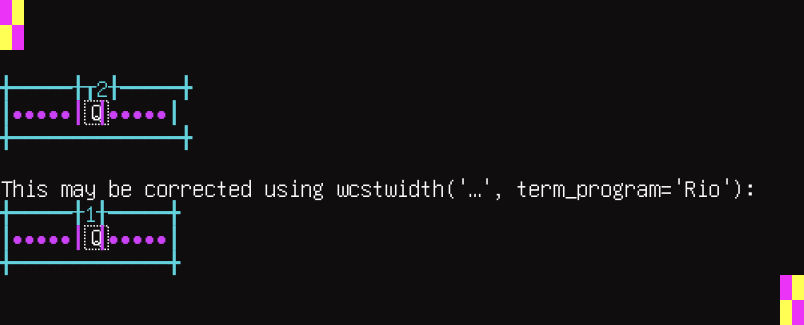
python wcwidth.wcswidth() measures width 2, while Rio measures width 1.
Narrow character support
Narrow character support of Rio is 100.0% (13 errors of 36254 codepoints tested).
Sequence of a NARROW character, from midpoint of alignment failure records:
# |
Codepoint |
Python |
Category |
wcwidth |
Name |
|---|---|---|---|---|---|
1 |
‘\u06dd’ |
Cf |
1 |
ARABIC END OF AYAH |
Total codepoints: 1
Shell test using printf(1),
'|'should align in output:$ printf "\xdb\x9d|\\n1|\\n" | 1|
python wcwidth.wcswidth() measures width 1, while Rio measures width 0.
Emoji ZWJ support
Compatibility of Rio with the Unicode Emoji ZWJ sequence table is 100.0% (0 errors of 1445 sequences tested).
Variation Selector-16 support
Emoji VS-16 results for Rio is 0 errors out of 426 total codepoints tested, 100.0% success. All codepoint combinations with Variation Selector-16 tested were successful.
Variation Selector-15 support
Emoji VS-15 results for Rio is 17 errors out of 158 total codepoints tested, 89.2% success. Sequence of a WIDE Emoji made NARROW by Variation Selector-15, from midpoint of alignment failure records:
# |
Codepoint |
Python |
Category |
wcwidth |
Name |
|---|---|---|---|---|---|
1 |
‘\u274c’ |
So |
2 |
CROSS MARK |
|
2 |
‘\ufe0e’ |
Mn |
0 |
VARIATION SELECTOR-15 |
Total codepoints: 2
Shell test using printf(1),
'|'should align in output:$ printf "\xe2\x9d\x8c\xef\xb8\x8e|\\n1|\\n" ❌︎| 1|
Screenshot:
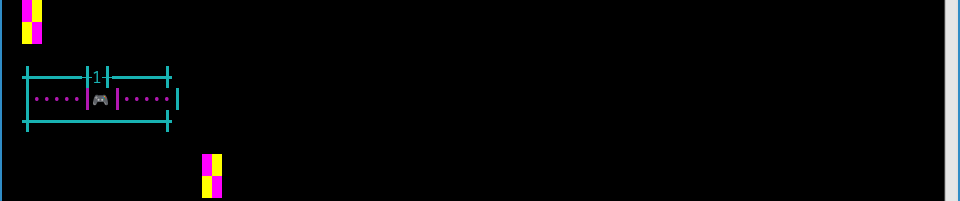
python wcwidth.wcswidth() measures width 1, while Rio measures width 2.
Standalone Regional Indicator support
Standalone Regional Indicator support of Rio is 0.0% (26 errors of 26 codepoints tested).
Sequence of a standalone Regional Indicator, from midpoint of alignment failure records:
# |
Codepoint |
Python |
Category |
wcwidth |
Name |
|---|---|---|---|---|---|
1 |
‘\U0001f1f3’ |
So |
2 |
REGIONAL INDICATOR SYMBOL LETTER N |
Total codepoints: 1
Shell test using printf(1),
'|'should align in output:$ printf "\xf0\x9f\x87\xb3|\\n12|\\n" 🇳| 12|
Screenshot:
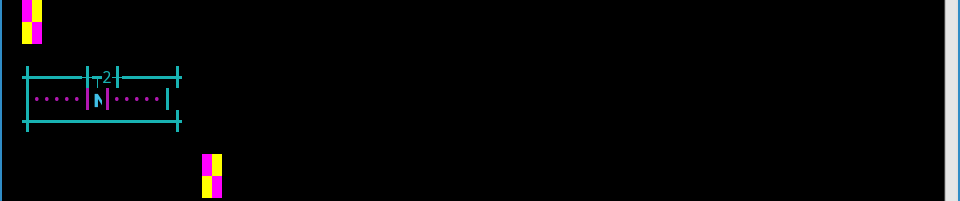
python wcwidth.wcswidth() measures width 2, while Rio measures width 1.
Standalone Fitzpatrick modifier support
Standalone Fitzpatrick skin tone modifier support of Rio is 0.0% (5 errors of 5 codepoints tested).
Sequence of a standalone Fitzpatrick modifier, from midpoint of alignment failure records:
# |
Codepoint |
Python |
Category |
wcwidth |
Name |
|---|---|---|---|---|---|
1 |
‘\U0001f3fd’ |
Sk |
2 |
EMOJI MODIFIER FITZPATRICK TYPE-4 |
Total codepoints: 1
Shell test using printf(1),
'|'should align in output:$ printf "\xf0\x9f\x8f\xbd|\\n12|\\n" 🏽| 12|
Screenshot:

python wcwidth.wcswidth() measures width 2, while Rio measures width 1.
Regional Indicator flag sequence support
Regional Indicator flag sequence support of Rio is 100.0% (0 errors of 262 sequences tested).
Graphics Protocol Support
Rio supports the following graphics protocols: Sixel, iTerm2 inline images, Kitty graphics.
Detection Methods:
Sixel and ReGIS: Sixel: Detected; ReGIS: Not detected via the Device Attributes (DA1) query
CSI c(\x1b[c). Sixel indicator (4): present, ReGIS indicator (3): not present.Kitty graphics: Detected by sending a Kitty graphics query and checking for an
OKresponse.iTerm2 inline images: Detected by drawing a 1x1 transparent image,
OSC 1337 ; File=inline=1, and checking that the cursor advanced a single column.iTerm2 capabilities: Not detected via the
OSC 1337 ; Capabilitiesquery, which does not describe image support, and does not contribute to this score.
Device Attributes
Raw response:
'\x1b[?62;4;6;22;52c'Service class: 62 (VT520)
Detected Extensions:
Code
Description
4
Sixel graphics
6
Selective erase
22
ANSI color
52
OSC 52 clipboard
Language Support
The following 112 languages were tested with 100% success:
(Jinan), (Yeonbyeon), Aja, Amarakaeri, Arabic, Standard, Assyrian Neo-Aramaic, Baatonum, Bamun, Belanda Viri, Bengali, Bhojpuri, Bora, Burmese, Catalan (2), Chakma, Chickasaw, Chinantec, Chiltepec, Chinese, Gan, Chinese, Hakka, Chinese, Jinyu, Chinese, Mandarin (Beijing), Chinese, Mandarin (Guiyang), Chinese, Mandarin (Harbin), Chinese, Mandarin (Nanjing), Chinese, Mandarin (Simplified), Chinese, Mandarin (Tianjin), Chinese, Mandarin (Traditional), Chinese, Min Nan, Chinese, Wu, Chinese, Xiang, Chinese, Yue, Colorado, Dagaare, Southern, Dangme, Dari, Dendi, Dinka, Northeastern, Ditammari, Dzongkha, Evenki, Farsi, Western, Fon, French (Welche), Fur, Ga, Gen, Gilyak, Gujarati, Gumuz, Hindi, Japanese, Japanese (Osaka), Japanese (Tokyo), Kabyle, Kannada, Khmer, Central, Korean, Lamnso’, Lao, Lingala (tones), Magahi, Maithili, Maldivian, Maori (2), Marathi, Mazahua Central, Mirandese, Mixtec, Metlatónoc, Mon, Mongolian, Halh (Mongolian), Mòoré, Nanai, Navajo, Nepali, Nuosu, Orok, Otomi, Mezquital, Panjabi, Eastern, Panjabi, Western, Pashto, Northern, Picard, Pular (Adlam), Saint Lucian Creole French, Sanskrit, Secoya, Seraiki, Shan, Shipibo-Conibo, Sinhala, Siona, South Azerbaijani, Tagalog (Tagalog), Tai Dam, Tamang, Eastern, Tamazight, Central Atlas, Tamil, Tamil (Sri Lanka), Telugu, Tem, Thai, Thai (2), Tibetan, Central, Ticuna, Uduk, Veps, Vietnamese, Vietnamese (Han nom), Waama, Yaneshaʼ, Yiddish, Eastern, Yoruba, Éwé.
The following 6 languages are not fully supported:
lang |
n_errors |
n_total |
pct_success |
|---|---|---|---|
71 |
419 |
83.1% |
|
22 |
293 |
92.5% |
|
10 |
530 |
98.1% |
|
1 |
82 |
98.8% |
|
1 |
110 |
99.1% |
|
1 |
844 |
99.9% |
Khün
Sequence of language Khün from midpoint of alignment failure records:
# |
Codepoint |
Python |
Category |
wcwidth |
Name |
|---|---|---|---|---|---|
1 |
‘\u1a20’ |
Lo |
1 |
TAI THAM LETTER HIGH KA |
|
2 |
‘\u1a6e’ |
Mc |
0 |
TAI THAM VOWEL SIGN E |
|
3 |
‘\u1a60’ |
Mn |
0 |
TAI THAM SIGN SAKOT |
|
4 |
‘\u1a2f’ |
Lo |
1 |
TAI THAM LETTER DA |
|
5 |
‘\u1a68’ |
Mn |
0 |
TAI THAM VOWEL SIGN UUE |
Total codepoints: 5
Shell test using printf(1),
'|'should align in output:$ printf "\xe1\xa8\xa0\xe1\xa9\xae\xe1\xa9\xa0\xe1\xa8\xaf\xe1\xa9\xa8|\\n12|\\n" ᨠᩮ᩠ᨯᩨ| 12|
Screenshot:
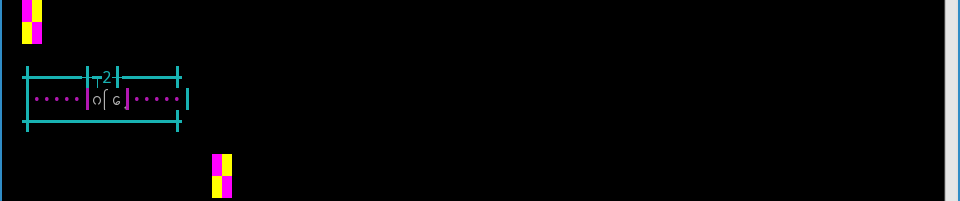
python wcwidth.wcswidth() measures width 2, while Rio measures width 3.
Sanskrit (Grantha)
Sequence of language Sanskrit (Grantha) from midpoint of alignment failure records:
# |
Codepoint |
Python |
Category |
wcwidth |
Name |
|---|---|---|---|---|---|
1 |
‘\U00011315’ |
Lo |
1 |
GRANTHA LETTER KA |
|
2 |
‘\U0001134d’ |
Mc |
0 |
GRANTHA SIGN VIRAMA |
Total codepoints: 2
Shell test using printf(1),
'|'should align in output:$ printf "\xf0\x91\x8c\x95\xf0\x91\x8d\x8d|\\n1|\\n" 𑌕𑍍| 1|
Screenshot:
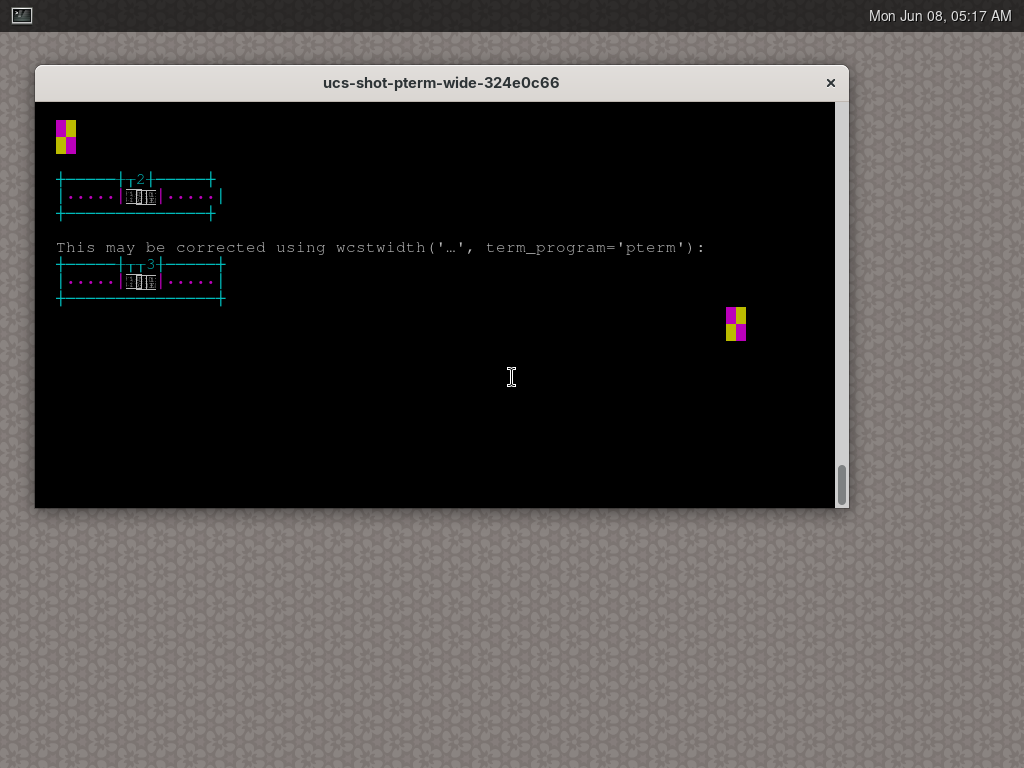
python wcwidth.wcswidth() measures width 1, while Rio measures width 2.
Javanese (Javanese)
Sequence of language Javanese (Javanese) from midpoint of alignment failure records:
# |
Codepoint |
Python |
Category |
wcwidth |
Name |
|---|---|---|---|---|---|
1 |
‘\ua98f’ |
Lo |
1 |
JAVANESE LETTER KA |
|
2 |
‘\ua9c0’ |
Mc |
0 |
JAVANESE PANGKON |
Total codepoints: 2
Shell test using printf(1),
'|'should align in output:$ printf "\xea\xa6\x8f\xea\xa7\x80|\\n1|\\n" ꦏ꧀| 1|
Screenshot:
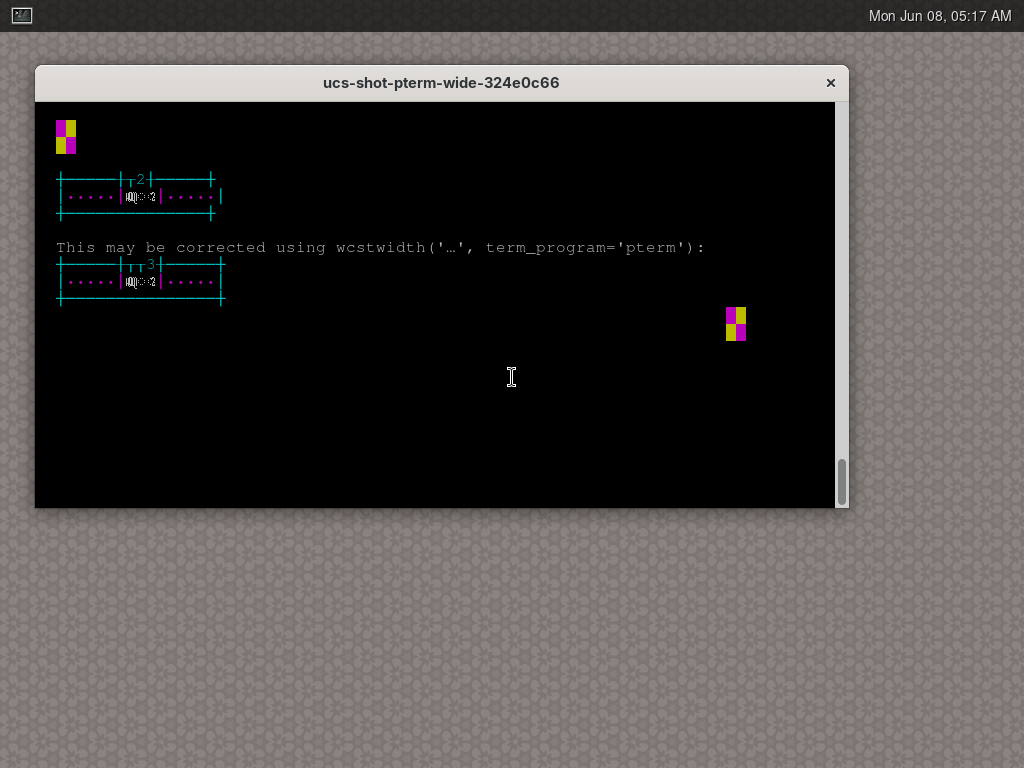
python wcwidth.wcswidth() measures width 1, while Rio measures width 2.
Urdu (2)
Sequence of language Urdu (2) from midpoint of alignment failure records:
# |
Codepoint |
Python |
Category |
wcwidth |
Name |
|---|---|---|---|---|---|
1 |
‘\u0601’ |
Cf |
1 |
ARABIC SIGN SANAH |
|
2 |
‘\u06f1’ |
Nd |
1 |
EXTENDED ARABIC-INDIC DIGIT ONE |
Total codepoints: 2
Shell test using printf(1),
'|'should align in output:$ printf "\xd8\x81\xdb\xb1|\\n12|\\n" ۱| 12|
Screenshot:
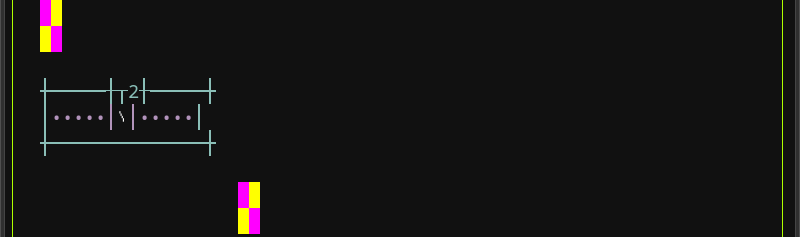
Urdu
Sequence of language Urdu from midpoint of alignment failure records:
# |
Codepoint |
Python |
Category |
wcwidth |
Name |
|---|---|---|---|---|---|
1 |
‘\u0601’ |
Cf |
1 |
ARABIC SIGN SANAH |
|
2 |
‘\u06f1’ |
Nd |
1 |
EXTENDED ARABIC-INDIC DIGIT ONE |
Total codepoints: 2
Shell test using printf(1),
'|'should align in output:$ printf "\xd8\x81\xdb\xb1|\\n12|\\n" ۱| 12|
Screenshot:

python wcwidth.wcswidth() measures width 2, while Rio measures width 1.
Malayalam
Sequence of language Malayalam from midpoint of alignment failure records:
# |
Codepoint |
Python |
Category |
wcwidth |
Name |
|---|---|---|---|---|---|
1 |
‘\u0d7b’ |
Lo |
1 |
MALAYALAM LETTER CHILLU N |
|
2 |
‘\u0d4d’ |
Mn |
0 |
MALAYALAM SIGN VIRAMA |
|
3 |
‘\u0d31’ |
Lo |
1 |
MALAYALAM LETTER RRA |
|
4 |
‘\u0d46’ |
Mc |
0 |
MALAYALAM VOWEL SIGN E |
Total codepoints: 4
Shell test using printf(1),
'|'should align in output:$ printf "\xe0\xb5\xbb\xe0\xb5\x8d\xe0\xb4\xb1\xe0\xb5\x86|\\n12|\\n" ൻ്റെ| 12|
Screenshot:
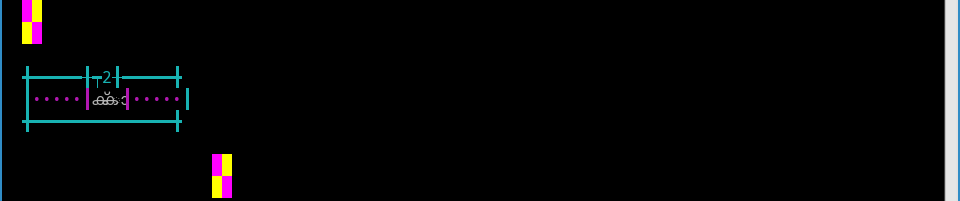
python wcwidth.wcswidth() measures width 2, while Rio measures width 3.
DEC Private Modes Support
DEC private modes results for Rio: 5 changeable modes of 5 supported out of 8 total modes tested (62.5% support, 62.5% changeable).
Complete list of DEC private modes tested:
Mode |
Name |
Description |
Supported |
Changeable |
Enabled |
|---|---|---|---|---|---|
1004 |
FOCUS_IN_OUT_EVENTS |
Send FocusIn/FocusOut events |
Yes |
Yes |
No |
1006 |
MOUSE_EXTENDED_SGR |
Enable SGR Mouse Mode |
Yes |
Yes |
No |
2004 |
BRACKETED_PASTE |
Set bracketed paste mode |
Yes |
Yes |
No |
2026 |
SYNCHRONIZED_OUTPUT |
Synchronized Output |
Yes |
Yes |
No |
2027 |
GRAPHEME_CLUSTERING |
Grapheme Clustering |
Yes |
Yes |
Yes |
2031 |
COLOR_PALETTE_UPDATES |
Color palette updates |
No |
No |
No |
2048 |
IN_BAND_WINDOW_RESIZE |
In-Band Window Resize Notifications |
No |
No |
No |
5522 |
BRACKETED_PASTE_MIME |
Bracketed Paste MIME |
No |
No |
No |
Summary: 5 changeable, 3 not changeable.
Kitty Keyboard Protocol
Rio supports the Kitty keyboard protocol.
# |
Flag |
Key |
Supported |
|---|---|---|---|
1 |
Disambiguate escape codes |
|
Yes |
2 |
Report event types |
|
Yes |
3 |
Report alternate keys |
|
Yes |
4 |
Report all keys as escape codes |
|
Yes |
5 |
Report associated text |
|
Yes |
Detection is performed by enabling all progressive enhancement
modes by set (CSI = 31 ; 1 u) and re-querying with CSI ? u
to confirm which modes the terminal honors, before restoring its
original flags.
XTGETTCAP (Terminfo Capabilities)
Rio supports the XTGETTCAP sequence and reports 204 terminfo capabilities (Full).
# |
Capability |
Description |
Value |
|---|---|---|---|
1 |
AX |
Supports default colors |
(empty) |
2 |
BD |
Enter bold mode (kitty) |
|
3 |
BE |
Exit bold mode (kitty) |
|
4 |
Cr |
Set cursor color |
|
5 |
Cs |
Reset cursor color |
|
6 |
E3 |
Erase scrollback |
|
7 |
Ms |
Clipboard set |
|
8 |
PE |
Presentation end (kitty) |
|
9 |
PS |
Presentation start (kitty) |
|
10 |
RGB |
Bits per color channel (8 = 24-bit truecolor) |
|
11 |
Se |
Reset underline style |
|
12 |
Smulx |
Styled underline |
|
13 |
Ss |
Set underline style |
|
14 |
Sync |
Synchronized output |
|
15 |
TN |
Terminal name |
|
16 |
XF |
Extended functionality |
(empty) |
17 |
XT |
Xterm extensions |
(empty) |
18 |
acsc |
Alternate character set |
|
19 |
am |
Auto right margin |
(empty) |
20 |
bce |
Background color erase |
(empty) |
21 |
bel |
Bell |
|
22 |
blink |
Enter blink mode |
|
23 |
bold |
Enter bold mode |
|
24 |
ccc |
Can redefine colors |
(empty) |
25 |
civis |
Hide cursor |
|
26 |
clear |
Clear screen |
|
27 |
cnorm |
Normal cursor |
|
28 |
colors |
Max colors on screen |
|
29 |
cols |
Columns |
|
30 |
cr |
Carriage return |
|
31 |
csr |
Change scroll region |
|
32 |
cub |
Cursor left n |
|
33 |
cub1 |
Cursor left |
|
34 |
cud |
Cursor down n |
|
35 |
cud1 |
Cursor down |
|
36 |
cuf |
Cursor right n |
|
37 |
cuf1 |
Cursor right |
|
38 |
cup |
Cursor address |
|
39 |
cuu |
Cursor up n |
|
40 |
cuu1 |
Cursor up |
|
41 |
cvvis |
Very visible cursor |
|
42 |
dch |
Delete n characters |
|
43 |
dch1 |
Delete character |
|
44 |
dim |
Enter dim mode |
|
45 |
dl |
Delete n lines |
|
46 |
dl1 |
Delete line |
|
47 |
dsl |
Disable status line |
|
48 |
ech |
Erase characters |
|
49 |
ed |
Clear to end of screen |
|
50 |
el |
Clear to end of line |
|
51 |
el1 |
Clear to start of line |
|
52 |
flash |
Flash screen |
|
53 |
fsl |
From status line |
|
54 |
home |
Cursor home |
|
55 |
hpa |
Horizontal position |
|
56 |
hs |
Has status line |
(empty) |
57 |
ht |
Horizontal tab |
|
58 |
hts |
Set tab stop |
|
59 |
ich |
Insert n characters |
|
60 |
il |
Insert n lines |
|
61 |
il1 |
Insert line |
|
62 |
ind |
Scroll forward |
|
63 |
indn |
Scroll forward n |
|
64 |
initc |
Initialize color |
|
65 |
invis |
Invisible cursor |
|
66 |
is2 |
Init 2 string |
|
67 |
it |
Init tabs |
|
68 |
kDC |
Shifted delete-char key |
|
69 |
kDC3 |
Alt delete-char key |
|
70 |
kDC4 |
Alt-Shift delete-char key |
|
71 |
kDC5 |
Ctrl delete-char key |
|
72 |
kDC6 |
Ctrl-Shift delete-char key |
|
73 |
kDC7 |
Ctrl-Alt delete-char key |
|
74 |
kDN |
Shifted down-arrow key |
|
75 |
kDN3 |
Alt down-arrow key |
|
76 |
kDN4 |
Alt-Shift down-arrow key |
|
77 |
kDN5 |
Ctrl down-arrow key |
|
78 |
kDN6 |
Ctrl-Shift down-arrow key |
|
79 |
kDN7 |
Ctrl-Alt down-arrow key |
|
80 |
kEND |
Shifted end key |
|
81 |
kEND3 |
Alt end key |
|
82 |
kEND4 |
Alt-Shift end key |
|
83 |
kEND5 |
Ctrl end key |
|
84 |
kEND6 |
Ctrl-Shift end key |
|
85 |
kEND7 |
Ctrl-Alt end key |
|
86 |
kHOM |
Shifted home key |
|
87 |
kHOM3 |
Alt home key |
|
88 |
kHOM4 |
Alt-Shift home key |
|
89 |
kHOM5 |
Ctrl home key |
|
90 |
kHOM6 |
Ctrl-Shift home key |
|
91 |
kHOM7 |
Ctrl-Alt home key |
|
92 |
kIC |
Shifted insert-char key |
|
93 |
kIC3 |
Alt insert-char key |
|
94 |
kIC4 |
Alt-Shift insert-char key |
|
95 |
kIC5 |
Ctrl insert-char key |
|
96 |
kIC6 |
Ctrl-Shift insert-char key |
|
97 |
kIC7 |
Ctrl-Alt insert-char key |
|
98 |
kLFT |
Shifted left-arrow key |
|
99 |
kLFT3 |
Alt left-arrow key |
|
100 |
kLFT4 |
Alt-Shift left-arrow key |
|
101 |
kLFT5 |
Ctrl left-arrow key |
|
102 |
kLFT6 |
Ctrl-Shift left-arrow key |
|
103 |
kLFT7 |
Ctrl-Alt left-arrow key |
|
104 |
kNXT |
Shifted next-page key |
|
105 |
kNXT3 |
Alt next-page key |
|
106 |
kNXT4 |
Alt-Shift next-page key |
|
107 |
kNXT5 |
Ctrl next-page key |
|
108 |
kNXT6 |
Ctrl-Shift next-page key |
|
109 |
kNXT7 |
Ctrl-Alt next-page key |
|
110 |
kPRV |
Shifted previous-page key |
|
111 |
kPRV3 |
Alt previous-page key |
|
112 |
kPRV4 |
Alt-Shift previous-page key |
|
113 |
kPRV5 |
Ctrl previous-page key |
|
114 |
kPRV6 |
Ctrl-Shift previous-page key |
|
115 |
kPRV7 |
Ctrl-Alt previous-page key |
|
116 |
kRIT |
Shifted right-arrow key |
|
117 |
kRIT3 |
Alt right-arrow key |
|
118 |
kRIT4 |
Alt-Shift right-arrow key |
|
119 |
kRIT5 |
Ctrl right-arrow key |
|
120 |
kRIT6 |
Ctrl-Shift right-arrow key |
|
121 |
kRIT7 |
Ctrl-Alt right-arrow key |
|
122 |
kUP |
Shifted up-arrow key |
|
123 |
kUP3 |
Alt up-arrow key |
|
124 |
kUP4 |
Alt-Shift up-arrow key |
|
125 |
kUP5 |
Ctrl up-arrow key |
|
126 |
kUP6 |
Ctrl-Shift up-arrow key |
|
127 |
kUP7 |
Ctrl-Alt up-arrow key |
|
128 |
kb2 |
Keypad center |
|
129 |
kbs |
Backspace key |
|
130 |
kcbt |
Back-tab key |
|
131 |
kcub1 |
Left arrow key |
|
132 |
kcud1 |
Down arrow key |
|
133 |
kcuf1 |
Right arrow key |
|
134 |
kcuu1 |
Up arrow key |
|
135 |
kdch1 |
Delete character key |
|
136 |
kend |
End key |
|
137 |
kent |
Enter/send key |
|
138 |
kf1 |
Function key F1 |
|
139 |
kf10 |
Function key F10 |
|
140 |
kf11 |
Function key F11 |
|
141 |
kf12 |
Function key F12 |
|
142 |
kf2 |
Function key F2 |
|
143 |
kf3 |
Function key F3 |
|
144 |
kf4 |
Function key F4 |
|
145 |
kf5 |
Function key F5 |
|
146 |
kf6 |
Function key F6 |
|
147 |
kf7 |
Function key F7 |
|
148 |
kf8 |
Function key F8 |
|
149 |
kf9 |
Function key F9 |
|
150 |
khome |
Home key |
|
151 |
kich1 |
Insert character key |
|
152 |
kind |
Scroll-down key |
|
153 |
km |
Has meta key |
(empty) |
154 |
kmous |
Mouse key |
|
155 |
knp |
Next page key |
|
156 |
kpp |
Previous page key |
|
157 |
kri |
Scroll-up key |
|
158 |
kxIN |
Keyboard in (kitty) |
|
159 |
kxOUT |
Keyboard out (kitty) |
|
160 |
lines |
Lines |
|
161 |
mc5i |
Will not echo input |
(empty) |
162 |
mir |
Move in insert mode |
(empty) |
163 |
msgr |
Move in standout mode |
(empty) |
164 |
npc |
No pad character |
(empty) |
165 |
oc |
Original colors |
|
166 |
op |
Original pair |
|
167 |
pairs |
Max color pairs |
|
168 |
rc |
Restore cursor |
|
169 |
rep |
Repeat character |
|
170 |
rev |
Enter reverse mode |
|
171 |
ri |
Reverse index |
|
172 |
rin |
Scroll reverse n |
|
173 |
ritm |
Exit italics mode |
|
174 |
rmacs |
Exit alternate charset mode |
|
175 |
rmam |
Disable line wrap |
|
176 |
rmcup |
Exit alt screen |
|
177 |
rmir |
Exit insert mode |
|
178 |
rmkx |
Keypad local mode |
|
179 |
rmm |
Reset meta mode |
|
180 |
rmso |
Exit standout mode |
|
181 |
rmul |
Exit underline mode |
|
182 |
rs1 |
Reset string 1 |
|
183 |
rs2 |
Reset string 2 |
|
184 |
sc |
Save cursor |
|
185 |
setab |
Set background color |
|
186 |
setaf |
Set foreground color |
|
187 |
sgr |
Set attributes |
|
188 |
sgr0 |
Reset attributes |
|
189 |
sitm |
Enter italics mode |
|
190 |
smacs |
Enter alternate charset mode |
|
191 |
smam |
Enable line wrap |
|
192 |
smcup |
Enter alt screen |
|
193 |
smir |
Enter insert mode |
|
194 |
smkx |
Keypad transmit mode |
|
195 |
smso |
Enter standout mode |
|
196 |
smul |
Enter underline mode |
|
197 |
tbc |
Clear all tabs |
|
198 |
tsl |
To status line |
|
199 |
u6 |
CPR response format |
|
200 |
u7 |
CPR request |
|
201 |
u8 |
DA response format |
|
202 |
u9 |
DA request |
|
203 |
vpa |
Vertical position |
|
204 |
xenl |
Newline glitch |
(empty) |
The XTGETTCAP sequence (DCS + q Pt ST) allows applications to query
terminfo capabilities directly from the terminal emulator, rather than relying
on the system terminfo database.
Text Sizing Protocol (OSC 66)
Rio does not support the Text Sizing protocol.
Tofu Detection
A tofu is the □ U+25A1 WHITE SQUARE placeholder box drawn in place of
a codepoint the terminal’s font has no glyph for. Two protocols allow a
program to ask which codepoints may ‘tofu’: mintty’s Font
Glyph Coverage Enquiry and the Glyph Protocol implemented first by Rio.
Rio answers by the Glyph Protocol q verb, APC 25a1.
Protocol: glyph
Warning
Both protocols answer about single codepoints only. They are without
support for grapheme clusters: ligatures, mark positioning, ZWJ joining,
VS-15 and VS-16 presentation, contextual forms, etc.
What is measured below is a property of the font this terminal was configured with when tested, and not of the terminal emulator: it is reported, but is not scored. GNU’s Unifont is sometimes configured for use.
Every assigned codepoint of Unicode version 18.0.0 that occupies a cell of its own is tested, less the ideographic extension and historic script ranges that no general-purpose font is known to carry.
Tofus were detected for 0 out of 73,679 codepoints tested.
Note
These ranges are left out of the sweep, and of the count above: they are
a tofu in all but a few specialist CJK and historic script fonts, and a
font meant for terminal use is not worse for lacking them. They account
for 94,515 of the 169,821 codepoints that could be tested; pass
ucs-detect --include-uncommon-codepoints to sweep them as well.
U+16FF0..``U+18CFF`` — Ideographic Symbols and Punctuation, Khitan Small Script, Tangut, Tangut Components (7,393 codepoints)U+18D00..``U+18DFF`` — Tangut Components Supplement, Tangut Supplement (148 codepoints)U+1B000..``U+1B2FF`` — Kana Extended-A, Kana Supplement, Nushu, Small Kana Extension (703 codepoints)U+20000..``U+2A6FF`` — CJK Unified Ideographs Extension B (42,720 codepoints)U+2A700..``U+2B73F`` — CJK Unified Ideographs Extension C (4,160 codepoints)U+2B740..``U+2B81F`` — CJK Unified Ideographs Extension D (223 codepoints)U+2B820..``U+2CEAF`` — CJK Unified Ideographs Extension E (5,774 codepoints)U+2CEB0..``U+2EBEF`` — CJK Unified Ideographs Extension F (7,473 codepoints)U+2EBF0..``U+2F7FF`` — CJK Unified Ideographs Extension I (622 codepoints)U+2F800..``U+2FFFF`` — CJK Compatibility Ideographs Supplement (542 codepoints)U+30000..``U+3134F`` — CJK Unified Ideographs Extension G (4,939 codepoints)U+31350..``U+323AF`` — CJK Unified Ideographs Extension H (4,192 codepoints)U+323B0..``U+3FFFD`` — CJK Unified Ideographs Extension J, Seal (15,626 codepoints)
No Unicode block holds a tofu: every codepoint tested has a glyph.
Truecolor Support
Rio supports 24-bit truecolor, detectable via:
XTGETTCAP (RGB capability): yes (RGB)
DECRQSS (truecolor probe): no
COLORTERM: yes (truecolor)
OSC 52 Clipboard Support
Rio supports OSC 52 clipboard operations (detected via DA1 extension 52 + XTGETTCAP Ms).
DA1 extension 52: yes
XTGETTCAP Ms: yes
Terminal Identification
Rio is identified as Rio version 0.5.27 (detected via XTVERSION + XTGETTCAP TN).
XTVERSION (raw): Rio 0.5.27
XTVERSION: yes
XTGETTCAP TN: yes (rio)
ENQ: no
TERM_PROGRAM: yes (rio)
TERM: yes (rio)
Reproduction
To reproduce these results for Rio, install and run ucs-detect with the following commands:
uvx ucs-detect --rerun data/rio.yaml
Test Performance
The test suite completed in 40.39 seconds (40s).
Mean CPU: 47.2%
Mean RSS: 109.7 MB
Total time: 40.4s
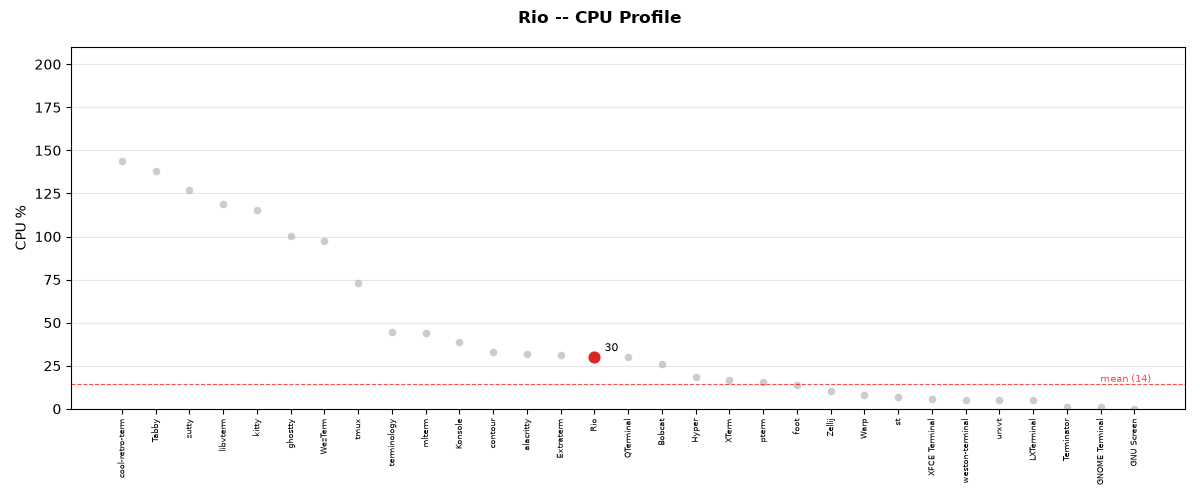
CPU usage during test execution for Rio.
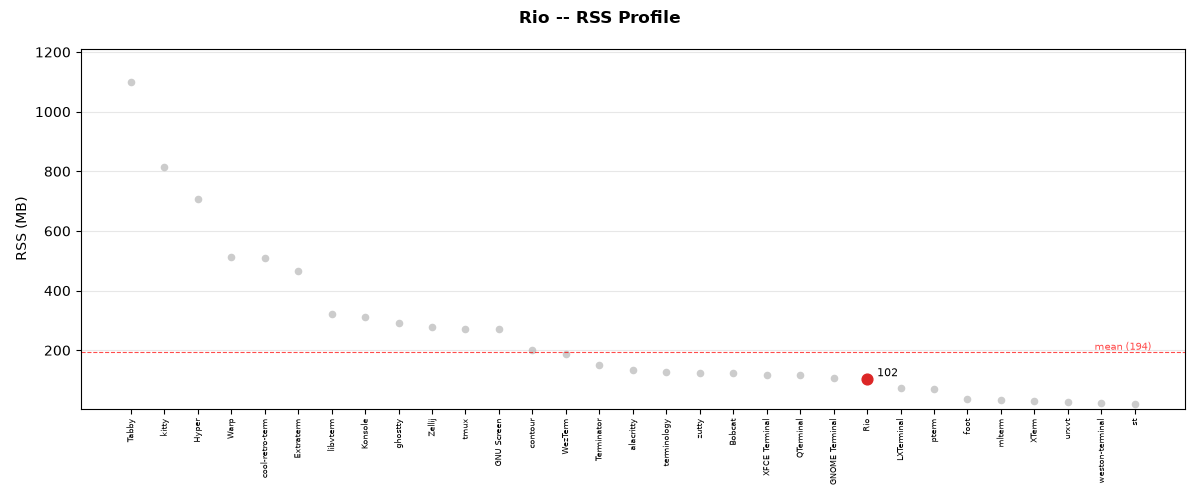
RSS memory usage during test execution for Rio.
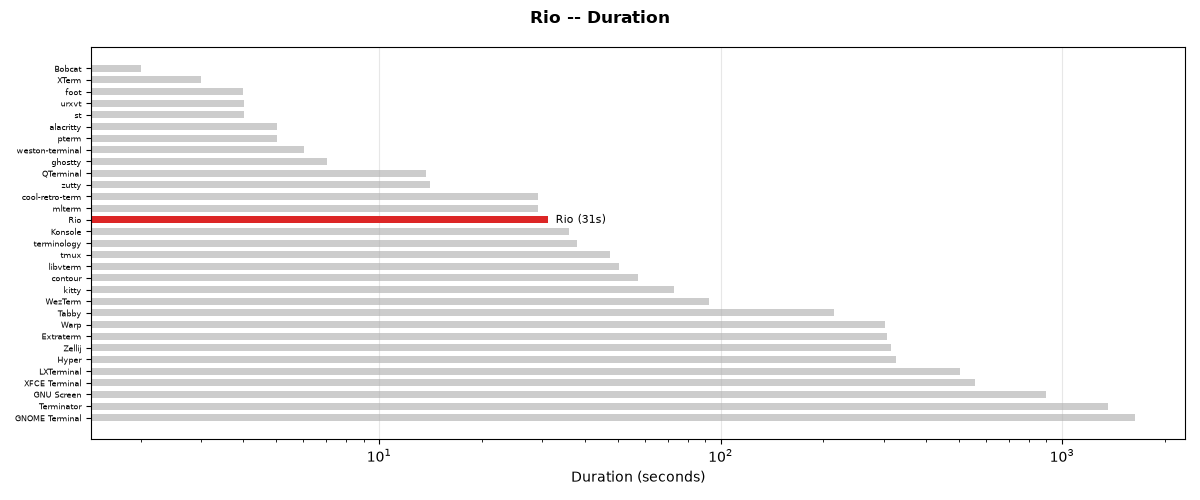
Test duration for Rio compared to all other terminals.
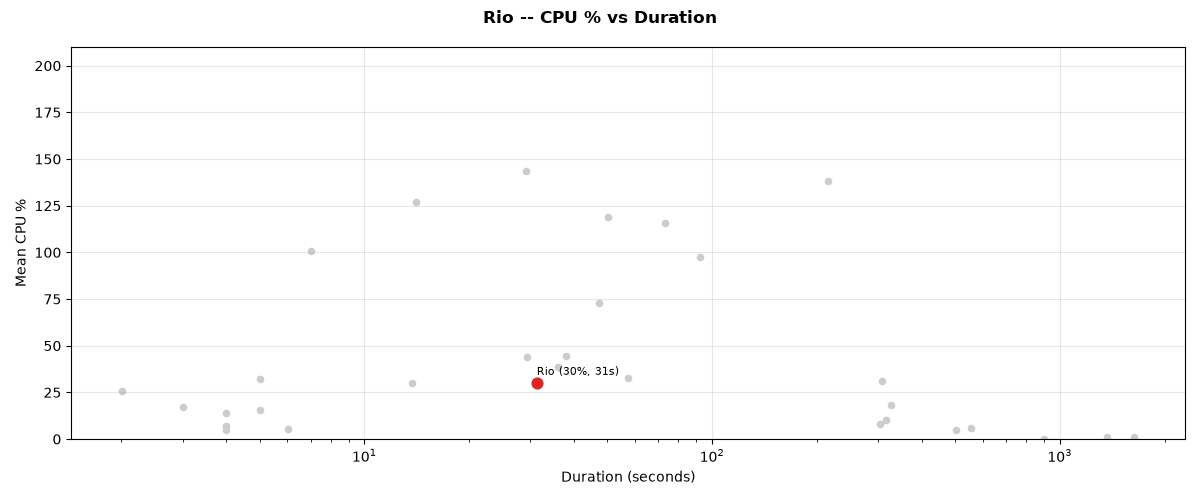
CPU % vs duration trade-off for Rio.